CSS stands for Cascading Style Sheets. It is a coding language used for describing the
presentation and formatting of a document written in HTML (Hypertext Markup Language). CSS
allows web designers and developers to control the layout, appearance, and style of web pages,
including elements such as text, images, backgrounds, and more.
With CSS, you can define various aspects of a webpage's visual presentation, such as colors,
fonts, spacing, positioning, and responsiveness for different devices. It provides a powerful
set of rules and properties that can be applied to HTML elements, either directly within the
HTML code or through an external CSS file.
CSS works by selecting specific HTML elements and applying styles to them. It uses a selector
syntax to target elements based on their tags, classes, IDs, or other attributes. Once selected,
you can specify various properties and values to define how the selected elements should be
styled.
By separating the presentation (CSS) from the structure (HTML) and behavior (JavaScript) of a
web page, CSS allows for better organization, maintainability, and flexibility in web
development. It enables consistent styling across multiple pages, simplifies updates, and
enhances the overall user experience.
Learning CSS is essential for web developers and designers as it allows them to control the visual presentation of web pages. With CSS, you can style and format HTML elements, create responsive layouts, and enhance user experience. It enables you to customize colors, fonts, spacing, and positioning, giving you creative control over the appearance of a website. Understanding CSS empowers you to create attractive and professional-looking designs, optimize page loading times, and improve accessibility. It is a fundamental skill for building modern, interactive, and responsive websites, making it a must-learn language for anyone interested in web development or design.
Inline CSS: This type of CSS is applied directly within the HTML tags using the "style"
attribute. Inline CSS is specific to individual elements and overrides any external or internal
CSS styles. For example:

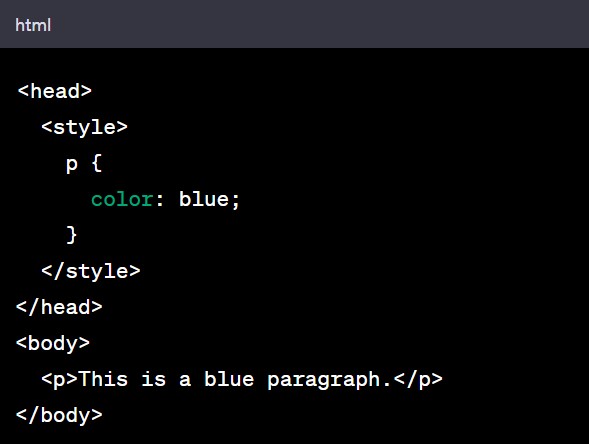
Internal CSS: Also known as embedded CSS, this type of CSS is defined within the style
tag
in the head section of an HTML document. Internal CSS applies styles to specific elements or
groups of elements within the same HTML file. For example:
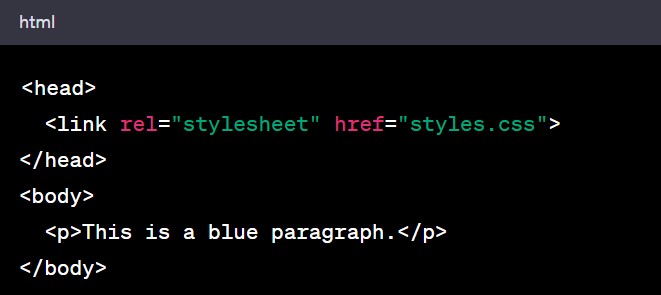
External CSS: External CSS is defined in a separate CSS file with a .css extension and linked to
the HTML document using the 'link' tag.This type of CSS allows for the separation of style and
structure, making it easier to maintain and update styles across multiple HTML files. For
example:
Here are a few common questions that people often have about CSS:
1. How do I change the font size and color of text using CSS?
2. How can I center an element horizontally and vertically using CSS?
3. What are CSS selectors and how do they work?
4. How can I create a responsive layout using CSS?
5. How do I create a CSS animation or transition?
6. How can I style links differently based on their state (hover, visited, active)?
7. How do I create a dropdown menu using CSS?
8. How can I create a CSS grid or flexbox layout?
9. How do I make an element float or position it on the page using CSS?
10. How can I apply CSS styles based on different screen sizes (media queries)?
These are just a few examples, and there are many more aspects and techniques within CSS.
Exploring CSS documentation, tutorials, and examples can help you dive deeper into the subject
and answer more specific questions you may have.
